A Motorola Programming Series
Understanding Modern Motorola CPS Programming
Motorola RSS to CPS: How Radio Programming Evolved
What is
Motorola Depot Software?
Introduction to Motorola RSS to CPS Evolution
Modern Motorola radios are programmed using advanced software know as CPS (Customer Programming Software). The CPS provides graphical interfaces, codeplugs, USB connectivity, and even over-the-air provisioning. However, Motorola programming did not begin this way.
Before CPS existed, Motorola radios were programmed using systems known as Radio Service Software (RSS). These earlier tools operated in a completely different computing environment and reflected the limitations of the technology available at the time.
Understanding Motorola RSS to CPS transition helps explain:
Why modern programming workflows exist
Why compatibility issues still occur today
How Motorola programming became more complex over time
Why legacy systems are still used by radio hobbyists and are topics of conversation by service technicians
This article explores how Motorola RSS to CPS evolved from simple DOS-based utilities into the modern software ecosystems used today.
Before Software Programming, Crystal Controlled Radios Ruled
Long before RSS or CPS existed, many radios used crystal-controlled channel systems.
In these radios:
Individual quartz crystals determined operating frequencies
Each channel required a matched crystal pair
Changing frequencies often required physically replacing hardware components
This meant:
Limited flexibility
Higher maintenance costs
Slower deployment changes
Physical modification of radios for reconfiguration
While primitive by todays standards, crystal-controlled radios established the foundation for programmable radio systems that followed.
What Radio Service Software (RSS) Was
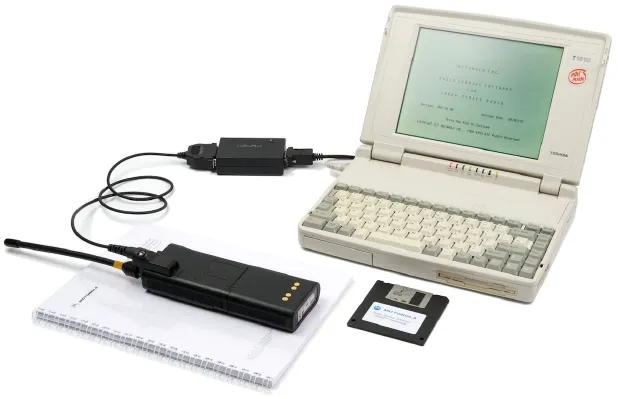
Motorola eventually introduced Radio Service Software (RSS) as a way to electronically configure radios using computers instead of hardware modifications.
RSS became the standard Motorola programming environment throughout much of the 1980s and 1990s.
Unlike modern CPS platforms of today, RSS:
Was DOS-based
Relied heavily on keyboard navigation
Used serial communication interfaces
Often required specific hardware timing conditions
Despite its limitations, RSS represented a major advancement because it allowed:
Faster radio configuration
Easier channel changes
Backup and restoration of programming data
More advanced radio feature control
The DOS Era of Radio Programming
RSS was designed during the era of MS-DOS computing. Programming a radio during this period often required:
Dedicated older computers
Real serial COM ports
Carefully matched software versions
Slower hardware environments
Current RSS user require computers running Pentium I or older hardware because newer systems are to fast and sometimes introduced compatibility problems.

Blue text-based interfaces
Keyboard-only navigation
Minimal mouse support
Strict timing requirements
Limited hardware compatibility
This environment was very different from the modern Windows-based CPS systems used today.
Limitations of RSS Programming
Although RSS was revolutionary for its time, it eventually showed several major limitations.
1. Hardware Dependency
RSS depended heavily on older computer hardware and true serial communication ports.
As computers evolved:
- Serial ports disappeared
- DOS became obsolete
- Timing-sensitive programming became unreliable
2. Increasing Radio Complexity
As radios gained more features, RSS systems became harder to manage thanks to new communication technologies such as:
- Trunking systems
- Digital voice modes
- Encryption
- Networking functions
- Large zone/channel structures
The older RSS architecture struggled to scale with these new demands.
3. User Accessibility
RSS systems required technical knowledge and familiarity with DOS environments. For many newer users:
- DOS Interfaces felt outdated
- Navigation was unintuitive
- Troubleshooting became difficult
The Introduction of CPS
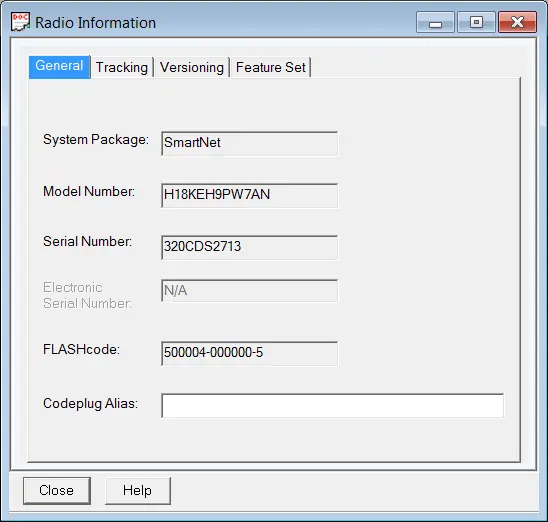
To address growing complexity, Motorola introduced the frist Customer Programming Software (CPS) version in 1997. The Motorola RSS to CPS transition begain with Windows 95, 98, and ME, and later updated for 32-bit Windows NT and XP based platforms. This transition modernized the entire programming workflow as CPS represented a major shift in modern radio programming philosophy. Instead of text-based DOS interfaces, CPS introduced:
Windows graphical environments
Mouse-driven navigation
Structured menus and trees
Improved organization of settings
Better hardware compatibility
Current CPS Compatibility and PC System Requirements
Motorola CPS was initially designed for the following Microsoft Windows operating systems:
Windows 95
Windows 98
Windows ME
Motorola CPS was subsequently updated to be compatible with:
32-bit Windows NT
Windows XP
This evolution allowed the software to function on more modern systems, although it still faces challenges on 64-bit versions of Windows. In general, most of the current CPS release versions of today, typically recommended the following PC specifications:
OS: Windows 10 or Windows 11 (32‑bit and 64‑bit supported for most recent 2025 CPS releases).
CPU: Dual‑core Intel i3 or equivalent (Intel i5 recommended).
RAM: 4 GB minimum (8 GB recommended).
Disk Space: 1-2 GB free for install (more for codeplug backups and firmware)
Ports: USB 2.0/3.0 port (for Motorola USB programming cable) or serial port/adapter as required by older radios.
Permissions: Local administrative rights to install drivers and software.
How Motorola RSS to CPS Transition Changed Programming Forever
The move from Motorola RSS to CPS, transformed radio programming in several important ways. The obvious inprovments included:
Easier User Interfaces
CPS made radio programming more accessible through:
- Graphical menus
- Tabs and navigation trees
- Organized configuration layouts
- Improved readability
This reduced the learning curve for many users.
Better Hardware Support
CPS was designed for modern Windows systems and newer communication standards. Advantages included:
USB support
Improved driver management
Better firmware integration
Expanded radio compatibility
Larger and More Complex Codeplugs
Modern radios became significantly more capable than earlier analog models. Motorola RSS to CPS supported:
Hundreds or thousands of channels
Advanced trunking systems
Digital modes
GPS features
Text messaging
Encryption management
This required far more sophisticated software structures.
Improved Codeplug Management
The transition of Motorola RSS to CPS improved how codeplugs were handled. This became especially important for commercial and public safety users who could now:
Save backups more easily
Archive configurations
Clone systems more efficiently
Organize large fleets of radios
The Rise of Digital Radio Systems
Motorola RSS to CPS transition also aligned with the industry shift toward digital radio technology. Motorola platforms evolved to support:
MotoTRBO
APCO P25
Digital trunking systems
IP-connected infrastructure
These technologies required:
More advanced configuration tools
Larger programming databases
Better firmware integration
Modern software architectures
Why Legacy RSS Systems Still Matter
Even though CPS dominates modern Motorola programming, RSS still remains relevant in several areas.
Many older radios still require RSS for programming as many are still in operation today. This includes:
Amateur radio
Commercial systems
Industrial environments
Collectors’ equipment
Understanding the transition of Motorola RSS to CPS helps explain:
Why certain programming terminology exists
Why compatibility issues can still persist
Why Motorola software evolved the way it did
As young Ham, my first radios were a Motorola X9000 mobile and a Motorola Saber handheld. Vintage Motorola systems remain popular among:
Radio collectors
Amateur radio operators
Retro computing enthusiasts
As a result, RSS continues to play a role decades after its introduction.
Summary of Motorola RSS to CPS Evolution
Motorola programming has evolved significantly over time. The progression of Motorola RSS to CPS generally followed this path:
Crystal-controlled radios
RSS DOS-based programming
Windows-based CPS systems
Modern digital and networked programming environments
Today’s CPS platforms are the result of decades of development and adaptation. Each stage reflected advances in:
Computing technology
Radio system complexity
User expectations
Infrastructure capabilities
Final Thoughts
Understanding the evolution of Motorola RSS to CPS transition provides important context for modern Motorola radio programming. What began as simple hardware-based channel control eventually became a sophisticated software ecosystem capable of managing large digital communication systems.
While modern CPS environments are far more user-friendly and powerful than earlier RSS systems, many of the core programming concepts still trace their roots back to those earlier tools.
For hobbyists, technicians, and radio enthusiasts like myself, learning this history helped me in bridging the gap between legacy Motorola equipment and the advanced programming workflows we use today.
If you enjoyed this article, be sure to check out the other posts in this Motorola Programming Series where I explore additional Motorola software systems, programming methods, and the history behind them.
Frequently Asked Questions (Motorola RSS to CPS)
What does RSS stand for in Motorola programming?
RSS stands for Radio Service Software. It was Motorola’s earlier DOS-based radio programming platform used before CPS systems became standard.
Were can I Get Motorola CPS?
Motorola CPS is only available from Motorola. The good news is that Motorola now provides an official and legitimate way for amateur radio operators and other end users to download FREE and LEGAL Motorola CPS. This includes radio platforms such as Motorola’s ASTRO, APX, and MotoTRBO series radios.
Read my article: How To Download FREE and LEGAL Motorola CPS to learn more.
What is the difference between RSS and CPS?
RSS used DOS-based text interfaces and older serial communication methods, while CPS uses modern Windows graphical interfaces with improved hardware and firmware support.
Why did Motorola replace RSS with CPS?
Motorola replaced RSS because radio systems became more advanced and required better software architecture, improved usability, and support for modern computer hardware.
Can old Motorola radios still use RSS?
Yes. Many older Motorola radios still require RSS because they were designed before CPS platforms existed.
What operating system did Motorola RSS use?
Most RSS software operated under MS-DOS or DOS-compatible environments.
Does CPS replace all RSS functionality?
For modern radios, yes. However, legacy radios may still require RSS because CPS does not support every older radio model.
Why are serial ports important for RSS?
RSS systems often depended on true hardware serial ports for timing-sensitive communication with radios. Modern USB adapters sometimes create compatibility problems with older RSS software.
What comes next in this series?
Part 3 explores Motorola Depot software, including its role in service environments and how it fit into Motorola’s broader programming ecosystem.
Were can I learn how use Motorola CPS Software?
Anyone can start learning to use Motorola CPS programming software with my Beginner’s Guide to Motorola ASTRO 25 CPS Video Series.
This series is a comprehensive 2+ hour series consisting of ten easy-to-follow “How-To” instructional videos. These videos are specifically designed for individuals who are new to the Motorola CPS and want to gain confidence in using it to program their radios.
What comes next in this series?
Part 3 explores Motorola Depot software, including its role in service environments and how it fit into Motorola’s broader programming ecosystem.
A Motorola Programming Series
Understanding Modern Motorola CPS Programming
Motorola RSS to CPS: How Radio Programming Evolved
What is
Motorola Depot Software?

