A Motorola Programming Series
Understanding Modern Motorola CPS Programming
Motorola RSS to CPS: How Radio Programming Evolved
What is
Motorola Depot Software?
Introduction to Modern Motorola CPS Programming 2026
Modern Motorola radio programming has shifted far away from the early days of hardware-based tuning and DOS-based software tools. Today, most Motorola land mobile radios are configured using Customer Programming Software (CPS), a Windows-based environment designed to manage everything from channel setup to advanced system behavior.
If you are just getting started, Motorola CPS programming can feel overwhelming because it involves Learn How To Use CPS Software, hardware interfaces, firmware rules, and structured configuration files known as codeplugs. However, once broken down into its core components, the process becomes logical and repeatable.
This first part of the series focuses entirely on how Motorola radios are programmed today, without diving too deeply into historical systems like RSS or Depot software. Those come later in the series.
What CPS (Customer Programming Software) Is Today
Customer Programming Software (CPS) is the modern configuration tool used to program Motorola two-way radios. Depending on the radio family, you may encounter:
CPS (legacy Windows CPS systems)
CPS2 (newer cloud-connected or modern architecture tools)
CPS 2.0 (updated interface for newer Motorola platforms)
At its core, Motorola CPS programming software is used to define how a radio behaves, including:
Channel frequencies
Talkgroups and zones
Power levels
Signaling formats
Scan lists
Button assignments
Encryption settings (if supported)
What a Codeplug Is (Core Concept)
A codeplug is the central configuration file used by Motorola radios. It contains all programmed settings for a radio, including:
Channel lists
System configurations
Audio settings
Network parameters
Feature enable/disable flags
When you “program” a Motorola radio today, you are not typing settings directly into the device, you are building or modifying a codeplug in CPS and then writing it to the radio.
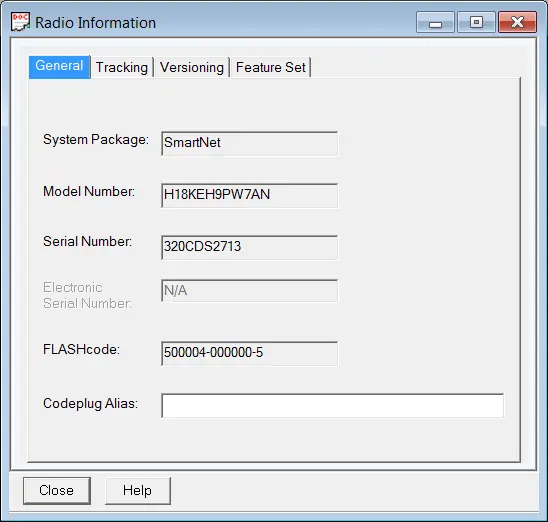
In simple terms: A codeplug is the complete personality of the radio.
How Modern Motorola Radios Are Programmed
There are several methods used today depending on the radio model and system design.
1. Computer to Radio Programming (Standard CPS Method)
This is the most common Motorola CPS programming workflow.
Connect radio to computer via USB programming cable
Open CPS software
Read existing codeplug from the radio and save a copy (optional but HIGHLY recommended).
Modify settings in CPS
Write updated codeplug back to the radio
Please, please, please, always save a copy of the original codeplug. Don't ask me why, its still very painful even tho its been years...
Correct Motorola programming cable
Installed USB drivers
Compatible CPS version for the radio model
2. Radio to Radio Programming (Cloning)
Cloning allows you to copy a working radio’s configuration directly to another radio without using CPS.
One radio is designated as the “master”
Settings are transferred via cable or sometimes RF-based methods (model dependent)
The second radio receives the same codeplug configuration
Field deployment of multiple identical radios
Rapid setup in emergency services or fleet environments
Reducing programming time when no PC is available
- Both radios must be compatible models or within the same family
3. Front Panel Programming (FPP)
Front Panel Programming allows limited changes directly from the radio keypad itself.
Add or modify channels
Adjust basic frequencies
Minor configuration changes
Not available on all models
Restricted compared to full CPS programming
Often disabled in professional or secure systems
FPP is typically used in field environments where a computer is not available.
4. Over-the-Air Provisioning (OTAP)
OTAP allows radios to receive configuration updates wirelessly through a system infrastructure.
A system controller sends configuration data over the network
Radios receive updates over RF or IP-based links
Codeplug updates are pushed remotely
Large fleet management
Public safety systems
Utilities and transportation networks
No physical access required
Fast deployment across multiple units
Requires system infrastructure support
Not available in all radio systems
This method is used for almost all configuration work in large deployments. Think of it like Microsoft pushing a Windows update to your PC, so you don't have to take your PC to the Geek Squad.
USB Cables, Drivers, and Firmware Basics
Motorola CPS programming is not just software-based only. It depends heavily on hardware compatibility as well.
USB Programming Cables
Each radio family typically requires a specific programming cable. These cables:
Convert USB signals into radio-compatible serial communication
May include internal chips for compatibility
Must match the correct radio model family
Drivers
Without the correct Motorola CPS programming drivers:
CPS cannot detect the radio
Read/write operations fail
Drivers vary depending on:
Radio series
CPS version
Computer Operating system
Firmware Considerations
Firmware is the internal operating system of the radio. Important rules:
CPS version must match or support the radio firmware level
Firmware mismatches can prevent programming
Some updates require manufacturer tools or service access
Basic Workflow of Motorola CPS Programming
A standard modern workflow looks like this:
Install correct CPS software
Install USB drivers
Connect radio via programming cable
Read existing codeplug and save a copy before making changes
Modify configuration:
Channels
Zones
Scan lists
Buttons/features
Validate settings
Write codeplug back to radio
Test radio operation
Save a copy after successful testing for future use and refferance.
Sample Programming Worksheet.xls - 1.05 MB
Common Motorola CPS Programming Mistakes by Beginners
New users often run into predictable issues when working with Motorola CPS programming.
Wrong CPS version: Using incompatible CPS software can prevent reading or writing codeplugs.
Skipping backups: Failing to read and save the original codeplug before changes can make recovery difficult.
Driver installation issues: Incorrect or missing drivers are one of the most common causes of connection failure.
Firmware mismatch: Attempting to write a codeplug created for a different firmware version can cause errors.
Overwriting working configurations: Making too many changes at once increases the risk of breaking system functionality.
Final Thoughts
Modern Motorola CPS programming is centered around the software and the concept of a codeplug-based configuration systems. Instead of direct hardware adjustments, radios are programmed through structured digital profiles that define every aspect of their behavior.
Key takeaways from Part 1:
CPS is the modern Motorola programming environment
Codeplugs define complete radio configurations
Programming is done via CPS, cloning, FPP, or OTAP
USB cables, drivers, and firmware compatibility are critical
Most errors come from version or setup mismatches
Frequently Asked Questions (Motorola CPS Programming)
What is Motorola CPS programming software used for?
Motorola CPS programming is used to configure radio settings such as channels, frequencies, scan lists, and system features. It allows technicians and users to program radios through a connected computer instead of manual hardware adjustments.
What is a codeplug in Motorola radios?
A codeplug is the configuration file that contains all programming data for a Motorola radio. It includes channel settings, system parameters, button assignments, and operational behavior.
Do all Motorola radios use CPS programming?
Most modern Motorola radios use CPS or CPS-based software. However, older radios used different systems such as Radio Service Software (RSS), which are covered in later parts of this series.
What is the difference between CPS and cloning?
Motorola CPS programming uses a computer to edit and write a codeplug to a Motorola branded radio. Cloning copies the configuration directly from one radio to another without requiring software.
Why won’t my Motorola radio connect to CPS?
Common causes include incorrect USB drivers, incompatible CPS version, faulty programming cables, or firmware mismatches between the radio and software.
What is OTAP in Motorola radios?
OTAP (Over-the-Air Provisioning) allows radios to receive programming updates wirelessly through a system infrastructure without direct physical connection.
What is the most common mistake made with Motorola CPS programming?
The most common mistake is using the wrong CPS version for the radio model, which can prevent reading or writing the codeplug correctly.
Part 2: RSS to CPS – How Motorola Programming Evolved
We will look at how earlier systems like RSS shaped modern CPS, and why Motorola transitioned away from DOS-based programming tools.
A Motorola Programming Series
Understanding Modern Motorola CPS Programming
Motorola RSS to CPS: How Radio Programming Evolved
What is
Motorola Depot Software?

