Beginners Guide To
Motorola ASTRO 25 CPS
Video Series
My Beginners Guide to Motorola ASTRO 25 CPS Video Series is a must-watch! Watch if you are unsure where to start, need further guidance or just want a refresher. This how-to instructional guide is geared towards the novice user of Motorola XTL Series Mobile and Motorola XTS Series Portable two-way radios.
Total Length
Level
July 2025
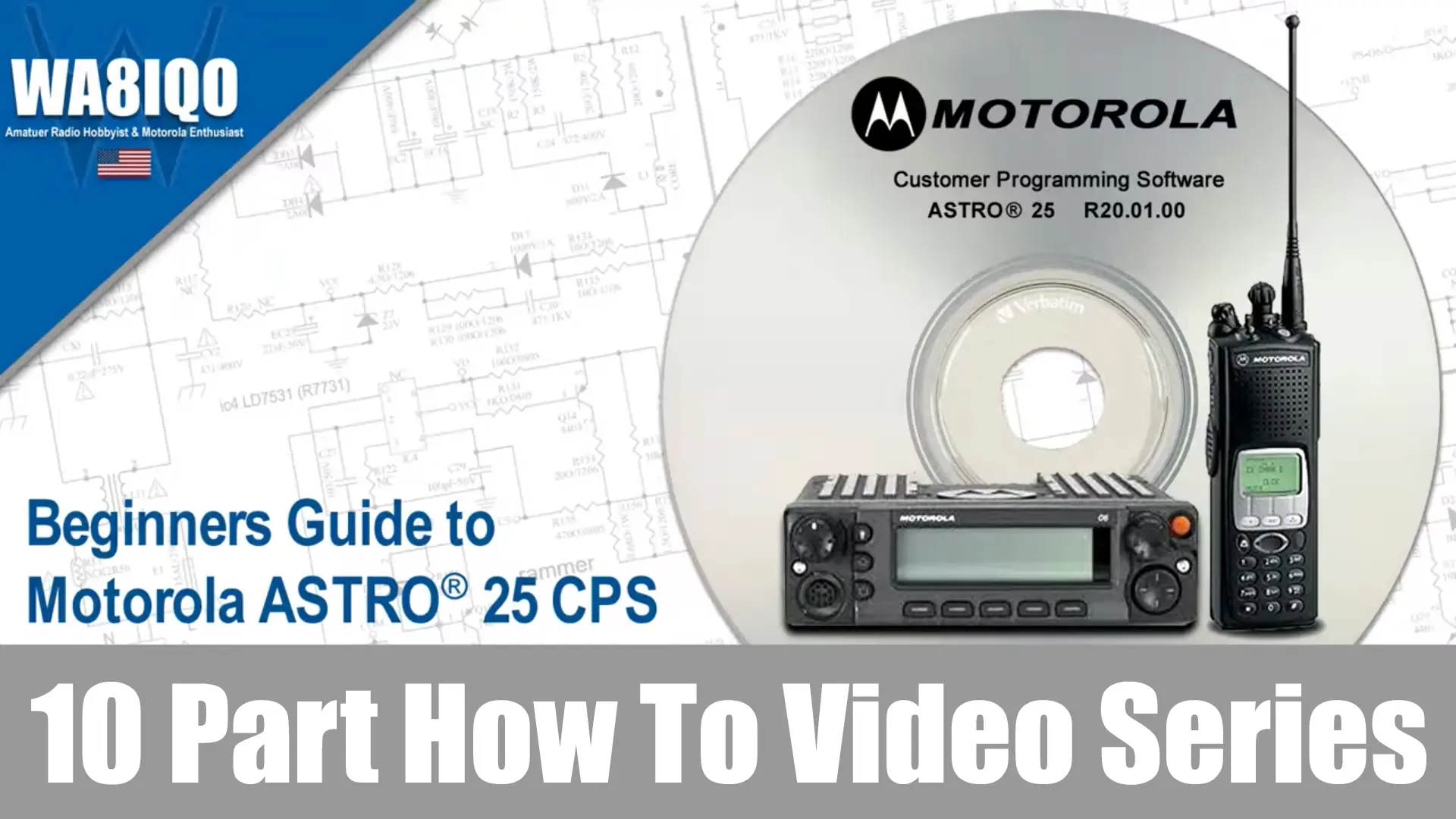
In my previous post Who Is Amateur Radio Operator WA8IQO, I mentioned that I was not only a Amateur Radio hobbyist but a Motorola Enthusiast. I discussed how Ham Radio operators who use Motorola commercial radios are a small minority that face numerous challenges. In this post I’m going to discuss how you can learn how to use Motorola ASTRO 25 CPS. This video series is beneficial in learning how to program Motorola XTL and XTS series two-way radios.
If you are new to the world of Motorola radios, you may find the array of features and programming options overwhelming. As part of my effort to reduce a steep learning curve, I want to bridge one of the many gaps you’ll encounter. Exploring the software and programming features of these radios can be a daunting task for beginners. But what if you haven’t gotten that far yet?
Watch all ten videos from start to finish as much as you want with an Amateur Radio Membership before you even boot the computer and try loading the software.
Familiarize yourself with the programming concepts before diving into complicated software and features packages. Selected lessions include additional downloadable content such as sample worksheets, code plugs, utilities and other content. The bonus downloads provided enhance the learning process and serve as a valuable support tool for all users.
Enjoy this FREE Sample Video!
Getting started with your learning journey in this Motorola ASTRO 25 CPS video series begins with an introduction to the basics of using ribless programming cables, along with important ASTRO Spectra considerations. You’ll also dive into radio-wide fundamentals, learning how to structure channels and program them effectively.
00:00 | Welcome To CPS
00:34 | Ribless Programming Cables
01:20 | ASTRO® Spectra Special Consideration
01:41 | Radio Wide Fundamentals
02:44 | Channel Structure
04:42 | Programming
04:32 | In Conclusion
- Sample Programming Worksheet.xls - 1.05 MB
What video's are included in the compleate series?
You’ll learn how to use Motorola ASTRO 25 CPS as your guided through every essential aspect. This series focuses on working with Motorola Customer Programming Software (CPS) R20.01.00 (RVN4186). This video series offers in-depth tutorials, each focusing on specific tools and features to ensure you have the skills to manage and program ASTRO 25 radios confidently.
Lesson 1: Getting Started
Getting started with your learning journey in this Motorola ASTRO 25 CPS video series begins with an introduction to the basics of using ribless programming cables, along with important ASTRO Spectra considerations. You’ll also dive into radio-wide fundamentals, learning how to structure channels and program them effectively.
Topics: Welcome To CPS | Ribless Programming Cables | ASTRO® Spectra Special Consideration | Radio Wide Fundamentals | Channel Structure Programming
Lesson 2: Learning The Basics
Once you have a solid foundation with the basics, your learning journey continues by taking you through the initial steps of connecting your CPS to the radio, how to use the Tree View to navigate the interface, and how to leverage the Help System for easy troubleshooting. You’ll also explore field access information and get familiar with the custom printing tool for generating reports.
Topics: Ribless Programming Cables | Port Selection | CPS to Radio Communications | Accessing and Using the Tree View | Using and Understanding the Help System | Locating and Using Field Access Information | Using the CPS Custom Printing Tool
Lesson 3: Setting Up CPS Channels
Let’s work on setting up cps channels in detail, from creating and deleting conventional modes to organizing channels into zones using the drag-and-drop functionality. The Zone Channel Assignment Wizard and Channel Picklist will also be demonstrated for easy organization and management.
Topics: Creating, Deleting and Defining Conventional Modes | Dragging and Dropping Personalities to Zones | Zone Channel Assignment Wizard | Channel Picklist
Lesson 4: Defining CPS User Preferences
Customizing the CPS experience by adjusting your user preference settings will improve your proficiency. You’ll learn how to import/export data, handle frequency offsets, and set up alias displays in the Tree View to make navigation smoother.
Topics: Accessing and Using CPS-User Preference Settings | Import & Export | Frequency Offset | Show Aliases on Tree View | Show Aliases for Selections
Lesson 5: Using CPS Special Features
It’s all about the features that elevate your programming experience. This video in the Motorola ASTRO 25 CPS series covers everything from front panel programming and single-radio POP25 programming, to batch programming multiple radios and utilizing text messaging. You’ll also learn how to set up multiple control heads, manage in-call user alerts, and programming using a pocket PC and more.
Topics: Front Panel Programming | POP25 | Text Messaging | Multiple Control Head & Intercom | In-Call User Alert | Programming with a Pocket PC (PDA) | Network Radio Programmer | Channel Announcement | Radio Location | Backlight Color | CPS Reports | High Performance Data (HPD)
Lesson 6: Using CPS Security Features
Focusing on securing your software and radios features should be a priority. You’ll be introduced to the Feature Access Setup, CPS passwords, FLASHport upgrades, and how to manage system keys. Understanding these security settings is essential for ensuring your feature set and firmware is correct and up-to-date.
Topics: Feature Access Setup | CPS Password | Read/Write Password | FLASHport Model Upgrades | FLASHport Warning for New Control Heads | Understanding the new FLASHport Hardware | Understanding and Completing the FLASHport Upgrade | Importing a Single System Key | System Key File Location | Advanced Keys Administrator
Lesson 7: Navigating The CPS
Don’t give up yet, let’s walk through the interface and how to quickly find features, use navigation and productivity toolbars, and understand alternate table views. Video seven also teaches you how to launch the current record and save invalid data to prevent programming errors.
Topics: Finding CPS Features | Using the Navigation Toolbars with All Screen Types | Using the Productivity Toolbar with All Screen Types | Using the Alternate Table View and the Short Cut Menu | Launch Current Record | Save Invalid Data
Lesson 8: Entering CPS Data
Get a hands-on look at how to efficiently input and export data, including using macros, dragging and dropping elements, and managing frequencies with the Picklist and Channel Picklist and more. You’ll also see how the Zone Channel Assignment Wizard helps streamline the process.
Topics: Import & Export | Fill Through | Macro Bar | Dragging and Dropping Personalities to Zones | Zone Channel Assignment Wizard | Frequency Offset | Frequency Picklist | Channel Picklist
Lesson 9: Dragging and Dropping CPS Data
Now that were coming to the end of this series, we should discuss the core concepts of drag-and-drop functionality, including how to move nodes across applications and frequency bands. You’ll also learn how to generate reports and assign your personalities to zones in a simple, intuitive way.
Topics: The Basics Concepts | Nodes Across Applications | Nodes Across Frequency Bands | The Drag and Drop Report | Personalities to Zones
Lesson 10: Cloning CPS Data
Now that were at the end of this Motorola ASTRO 25 CPS video series, you should have a comprehensive understanding of how to use the Motorola ASTRO 25 CPS software to program and manage your radio with ease, making you an expert!
We will now wrap up this series by learning how to clone data across multiple radios using the Clone Wizard and Clone Express tools. This is a critical feature for managing large fleets of radios quickly and efficiently.
Topics: Clone Wizard | Clone Express
By the end of this premium video series, you’ll have learn how to use Motorola ASTRO 25 CPS. You will have a comprehensive understanding of how to use the Motorola ASTRO 25 CPS to program and manage radios with ease, making you an expert in no time!
You can unlock unlimited access to the Beginners Guide to Motorola ASTRO 25 CPS Video Series, along with all my other exclusive amateur radio premium content. Sign up today for an Amateur Radio Membership and get unlimited streaming access to all how-to videos, how-to articles and resources, allowing you to learn at your own pace and revisit the content as often as you like throughout your membership period.
Don’t miss out, become a member now!
Frequently Asked Questions
What is the Motorola ASTRO 25 CPS video series?
The Motorola ASTRO 25 CPS video series is a structured set of tutorials that demonstrates how to use Customer Programming Software (CPS) for ASTRO 25 radios. It is designed to help users learn how to read, edit, and write radio codeplugs using step-by-step visual instruction.
Who is the ASTRO 25 CPS video series for?
This series is intended for:
- Beginner and intermediate radio technicians
- Amateur radio operators learning Motorola programming concepts
- Users transitioning from basic programming to ASTRO 25 systems
- Anyone needing a visual guide to CPS workflows
What topics are covered in the ASTRO 25 CPS video series?
Typical topics include:
- Reading and writing radio codeplugs
- Editing channels, zones, and personalities
- Understanding CPS layout and menus
- Saving and backing up configurations
- Basic troubleshooting of CPS connection issues
Do I need special software to follow the ASTRO 25 CPS tutorials?
Yes. You typically need the correct version of Motorola ASTRO 25 CPS software for your specific radio model. Each radio family (such as XTS, XTL, or APX-based ASTRO systems) requires compatible CPS software versions.
What is a codeplug in ASTRO 25 CPS?
A codeplug is the complete configuration file inside a Motorola radio. It contains:
Channel frequencies
Talkgroups or personalities
Signaling options (PL/DPL, NAC, etc.)
Scan lists and zone structure
The CPS software is used to modify and manage this file.
Why won’t my radio connect to ASTRO 25 CPS?
Common causes include:
- Incorrect CPS version for the radio model
- Missing or incorrect USB drivers
- Faulty programming cable
- Radio not in programming mode
- Incompatible firmware and CPS mismatch
What is the difference between ASTRO 25 CPS and older Motorola RSS software?
ASTRO 25 CPS is Windows-based software used for newer and digital ASTRO systems. RSS (Radio Service Software) is older DOS-based software used for legacy analog Motorola radios. They are not interchangeable.
Can I use these videos to learn programming from scratch?
Yes. The series is suitable for beginners because it demonstrates real CPS workflows visually. However, understanding basic radio concepts (channels, frequencies, and zones) will make the learning process easier.
Do ASTRO 25 radios use the same CPS software across all models?
No. Different ASTRO 25 radios require different CPS versions depending on:
- Radio series (portable vs mobile)
- Firmware generation
- Feature set enabled on the radio
What is a programming cable in ASTRO 25 CPS?
A programming cable connects the radio to a computer running CPS. It allows data transfer between the radio and software so the codeplug can be read, edited, or written back to the device.
Why is backing up a codeplug important?
Backing up a codeplug ensures you can restore the original radio configuration if:
- A programming error occurs
- A setting is accidentally changed
- The radio becomes unresponsive after writing changes
Can mistakes in CPS programming affect radio performance?
Yes. Incorrect settings can:
- Disable channels
- Prevent transmission or reception
- Cause scan or signaling issues
- In rare cases, require full reprogramming from backup
Is ASTRO 25 CPS difficult to learn?
The software has a steep learning curve because it is designed for professional and mission-critical radio systems. However, step-by-step video tutorials significantly reduce complexity by showing real configuration workflows.
What should I learn before using ASTRO 25 CPS?
It helps to understand:
- Basic radio terminology (frequency, channel, repeater)
- Zone vs channel structure
- Analog vs digital signaling basics
- General computer file management (saving, exporting, backups)
Why is ASTRO 25 CPS still widely used?
ASTRO 25 systems remain widely deployed in public safety and commercial infrastructure. CPS is required to maintain, update, and configure these mission-critical communication networks.